BrainCut AI

For Adobe Premiere Pro

Edit faster in Premiere Pro.
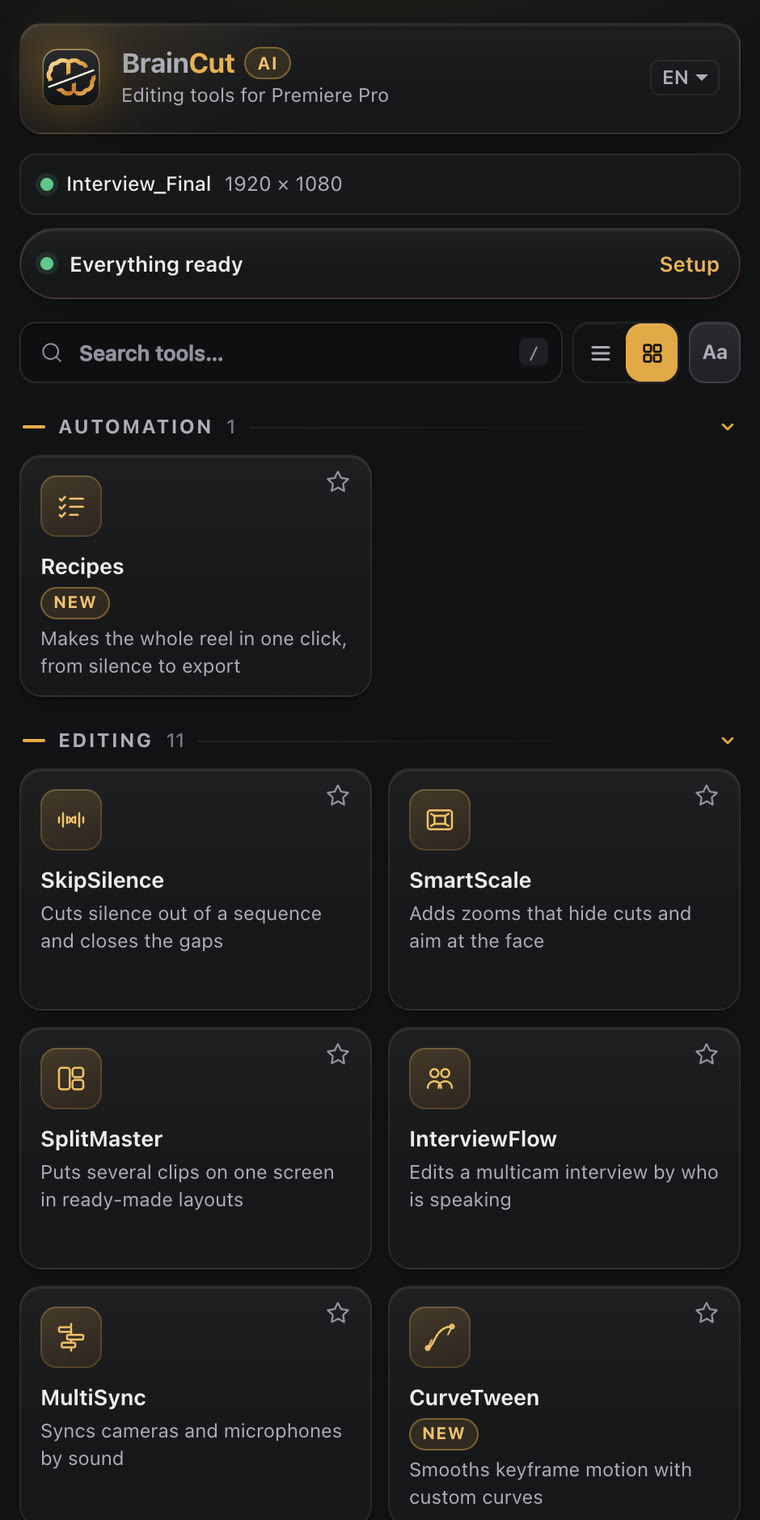
31 tools, one panel.

Cut silence, add captions, find B-roll, clean voices, reframe for vertical and export. All from one panel that works on your timeline and undoes with one click.

macOS and Windows. Premiere Pro 2022 and newer. Free plan with no card.
  • Runs on your computer
  • Undo on every action
  • Works offline for 6 hours
  • Cancel anytime
BrainCut AI panel in Premiere Pro
  • 31tools in one panel
  • 1 clickto undo anything
  • Localtranscription and AI
  • Mac + WinPremiere Pro 2022+

See it work

A short tour of the panel inside Premiere Pro.

The tools editors reach for every day

Real screenshots of the panel. Everything you see here runs inside Premiere Pro.

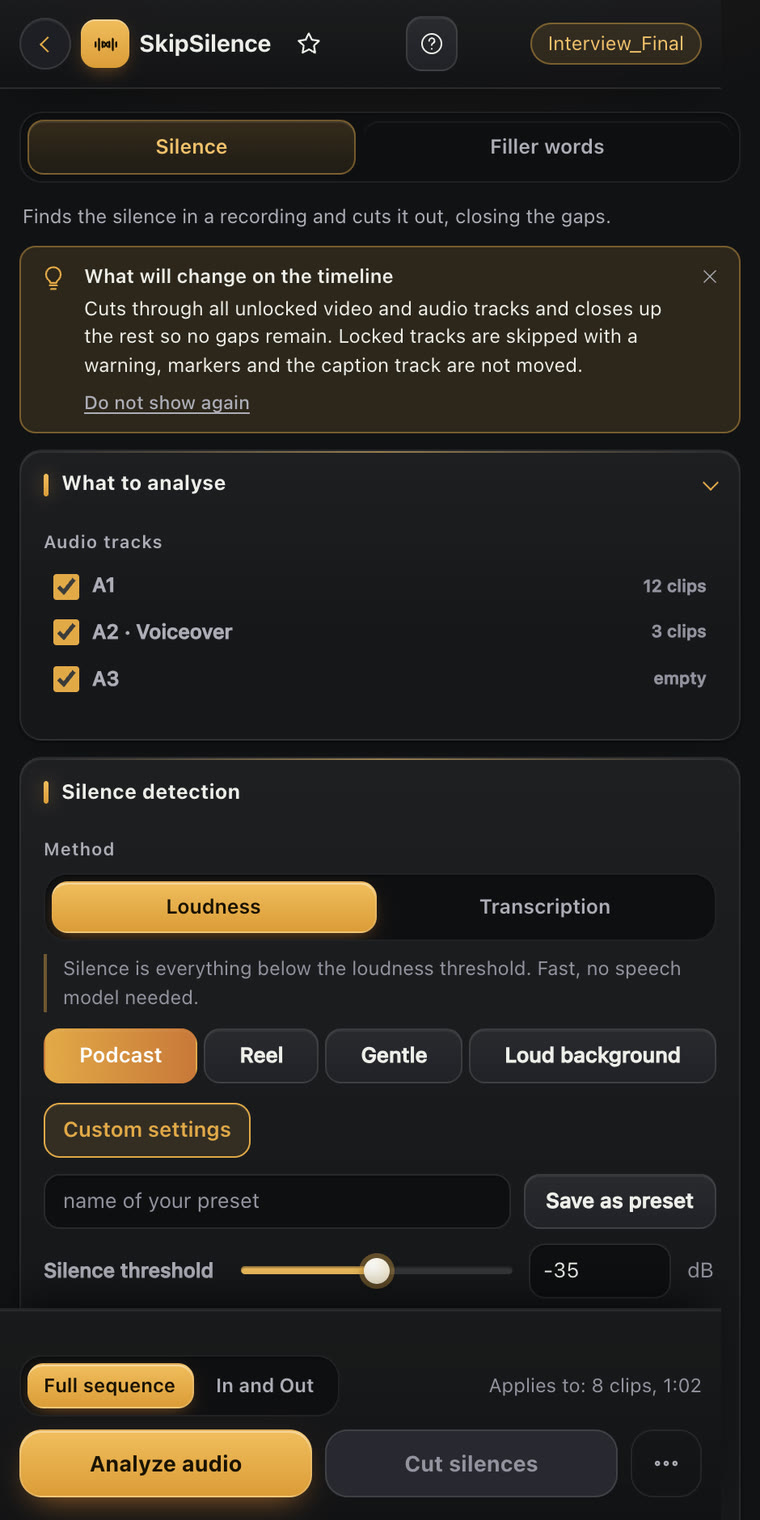
SkipSilence

SkipSilence

Cut the silence in one pass

SkipSilence finds the pauses in your recording, removes them across all tracks and closes the gaps. Pick a preset for podcasts, reels or loud rooms, or tune it yourself.

  • Detects by loudness or by transcription
  • Presets: Podcast, Reel, Gentle, Loud background
  • A Filler words tab removes the ums and ahs
  • Undo restores every cut
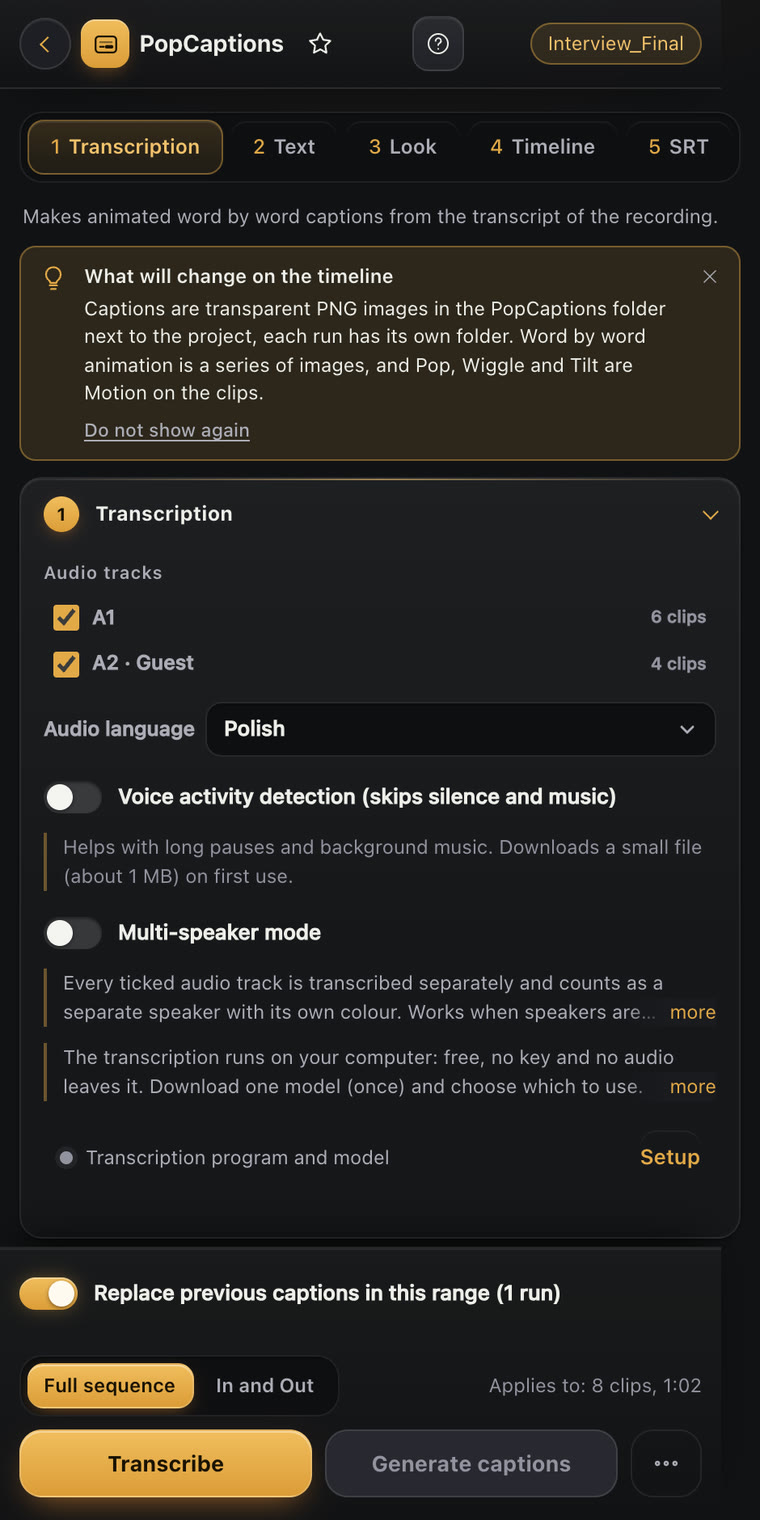
PopCaptions

PopCaptions

Captions that pop, word by word

PopCaptions transcribes your recording and builds animated captions from the transcript. Choose the look, the timing and the animation.
  • Transcription runs on your computer, no key needed
  • Multi-speaker mode with a color per speaker
  • Pop, Wiggle and Tilt animations
  • Import and export SRT
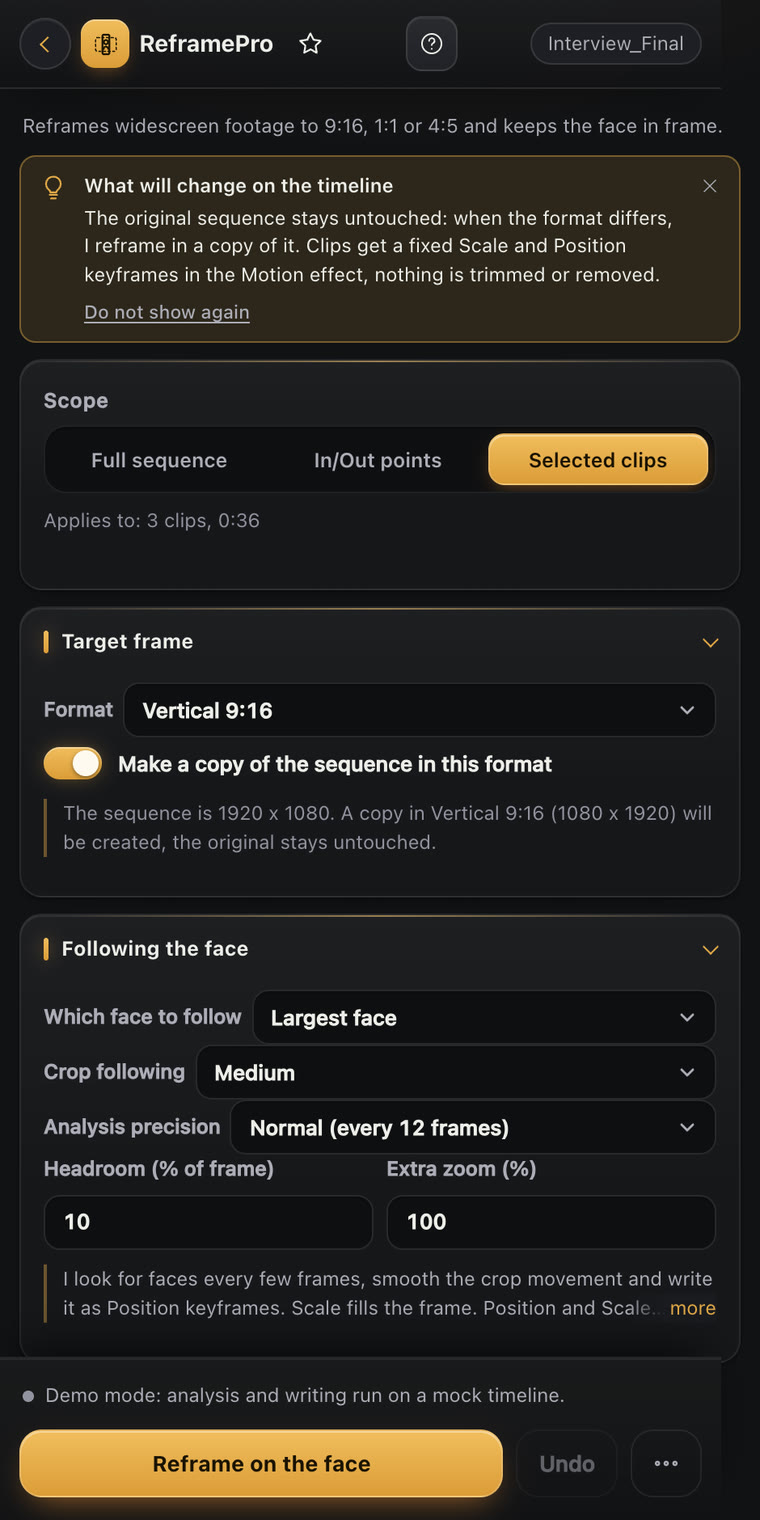
ReframePro

ReframePro

Vertical in one click, face included

ReframePro turns a widescreen edit into 9:16, 1:1 or 4:5. The crop follows the face and moves smoothly as keyframes, on a copy of your sequence.
  • Follows the face, smoothed motion
  • Works on a copy, your original stays untouched
  • Keyframes you can still adjust
  • Undo restores the clips
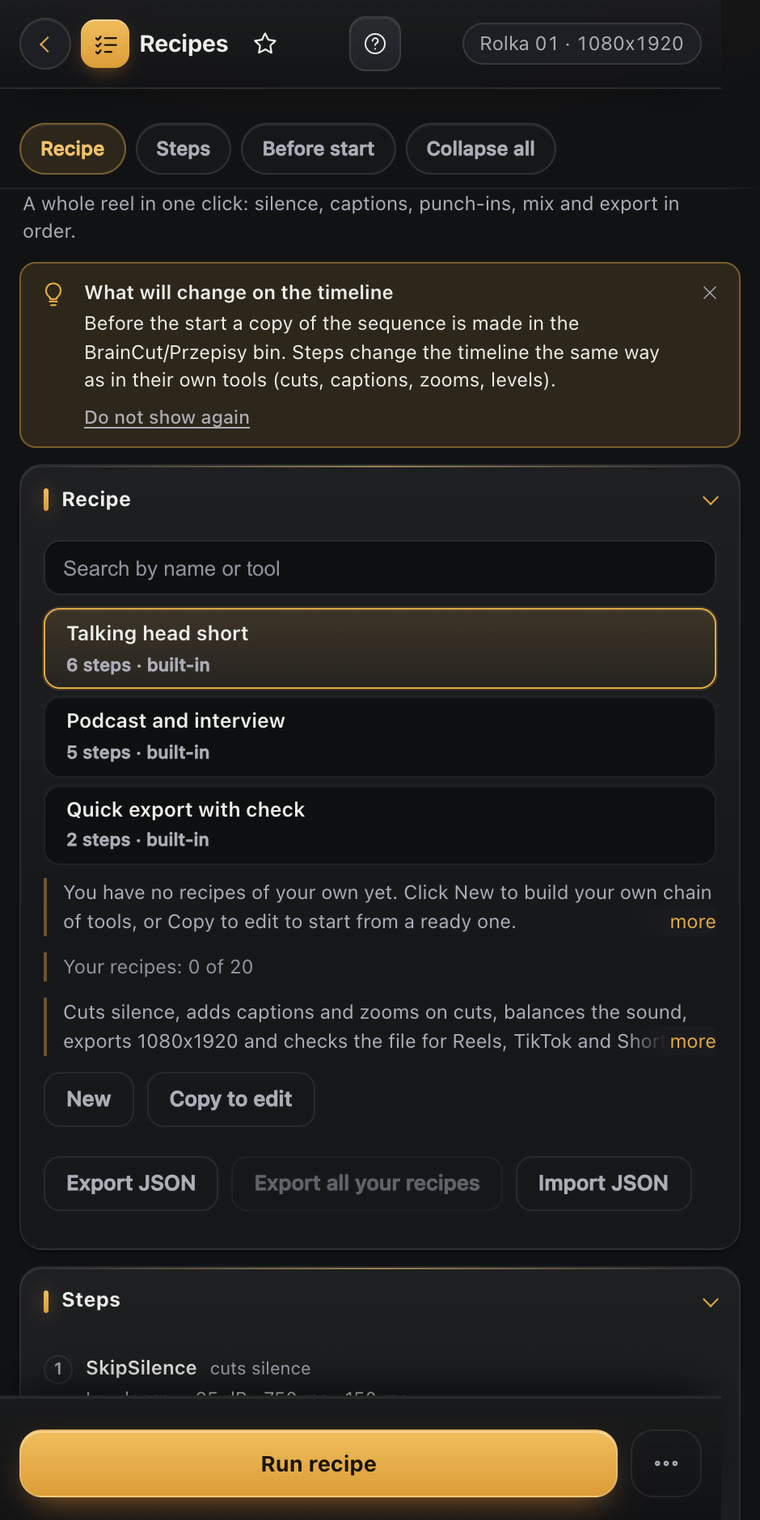
Recipes

Recipes

The whole reel, one button

Recipes run a chain of tools for you: silence, captions, zooms, mix, voice cleanup, reel and export. Use the ready recipes or build your own.

  • Checks every step before it starts
  • Makes a copy of your sequence first
  • Stops on an error, cancel anytime
  • Save up to 20 recipes of your own

31 tools that take the boring work out of editing

Every tool opens in one panel inside Premiere Pro, works on your sequence and undoes with one click. Each tool shows the plan it belongs to.

  • SplitMasterLays out several clips on one screen in ready-made layouts.Free
  • SkipSilenceCuts silence out of the sequence and closes the gaps.Free
  • Timeline CheckFinds gaps, offline media and other problems before you export.Free
  • MediaOrganizerSorts imported media into bins automatically.Free
  • SmartScaleAdds punch-in zooms that hide cuts and aim at the face.Starter
  • SafeZoneShows safe zones for reels, posts and widescreen video.Starter
  • ShortifyTurns a long recording into a vertical short or a teaser.Starter
  • InterviewFlowCuts a multi-camera interview by who is speaking.Starter
  • MultiSyncSyncs cameras and microphones by sound, timecode or a clap.Starter
  • CutBoardA notepad and task board that lives inside your project.Starter
  • ProjectCleanerCleans a project and packs it with its media for a client.Starter
  • EasyExportOne-click export presets with a timeline check first.Starter
  • DeliveryCheckChecks the exported file before you send it.Starter
  • PopCaptionsAnimated word-by-word captions from a transcript.Pro
  • AutoB-RollPicks B-roll that fits the speech and places it on the timeline.Pro
  • ThumbCraftMakes thumbnails from the sharpest frames with faces.Pro
  • AutoMixBalances levels and ducks music under speech.Pro
  • BeatSyncCuts clips on the beat of the music.Pro
  • VoiceCleanCleans speech: noise, clicks, wind, reverb and tone.Pro
  • PitchLockChanges clip speed without a chipmunk voice.Pro
  • PaletteGrabPulls a color palette from any frame, with matching colors.Pro
  • LookMatchMatches the look of a reference frame with Lumetri.Pro
  • BatchRenderQueues many sequences in Media Encoder in one go.Pro
  • RecipesRuns a whole workflow, from silence to export, with one button.Pro
  • CurveTweenCustom easing curves for keyframes and tweens on cuts.Max
  • ReframePro9:16, 1:1 or 4:5 reframe that follows the face.Max
  • ZoomPulseRhythmic zoom pushes on voice accents.Max
  • UpScaleUpscales video with neural networks, denoises and adds in-between frames.Max
  • AnimifyBuilds designed captions and graphics from ready blocks on your timeline.Max
  • StemSplitSeparates voice, music and effects from a recording.Max
  • SmartPasteBrings media from the clipboard and links into your project.Max

From install to first cut in 5 minutes

  1. InstallRun the installer for macOS or Windows and restart Premiere Pro.
  2. Open the panelIn Premiere Pro choose Window, Extensions, BrainCut AI and create your account.
  3. Pick a toolChoose the tool, pick the range (whole sequence, In to Out or selected clips) and press the button. Undo restores everything.

Simple pricing, 7 days free

Start any paid plan with a 7-day free trial. Cancel before it ends and you pay nothing. Switch plans or cancel anytime in the customer portal.

Free

Try the essentials, free forever.

$0forever

No card needed

Download free
  • Includes 4 tools: SplitMaster, SkipSilence, Timeline Check, MediaOrganizer
  • 4 tools in total
  • 1 computer

Starter

Everyday editing, faster.

$9/ month

Billed monthly

Start 7-day free trial
  • Everything in Free plus 9 tools: SmartScale, SafeZone, Shortify, InterviewFlow, MultiSync, CutBoard, ProjectCleaner, EasyExport, DeliveryCheck
  • 13 tools in total
  • 1 computer
  • 7-day free trial, cancel anytime
Most popular

Pro

Captions, sound and color on top.

$19/ month

Billed monthly

Start 7-day free trial
  • Everything in Starter plus 11 tools: PopCaptions, AutoB-Roll, ThumbCraft, AutoMix, BeatSync, VoiceClean, PitchLock, PaletteGrab, LookMatch, BatchRender, Recipes
  • 24 tools in total
  • 2 computers
  • 7-day free trial, cancel anytime

Max

Everything, including the heavy AI tools.

$39/ month

Billed monthly

Start 7-day free trial
  • Everything in Pro plus 7 tools: CurveTween, ReframePro, ZoomPulse, UpScale, Animify, StemSplit, SmartPaste
  • 31 tools in total
  • 3 computers
  • 7-day free trial, cancel anytime

Prices in US dollars. Taxes are calculated at checkout by Polar. Use the same email at checkout and in the plugin so your plan unlocks automatically.

Questions

Which versions of Premiere Pro are supported?

Premiere Pro 2022 (version 22.0) and newer, on macOS and Windows.

How does the free trial work?

Every paid plan starts with 7 days free. You enter a card at checkout, we do not charge it during the trial, and the first payment happens after day 7. Cancel before that and you pay nothing. The Free plan needs no card.

Do my recordings leave my computer?

No. Transcription and the AI planning tools run on your computer, using models you download once in the panel. Only your account email and license data are stored on our server in the EU. Some tools can optionally fetch stock footage by keyword from Pexels or Pixabay with your own free key.

How many computers can I use?

Starter includes 1 computer, Pro 2 and Max 3. You can move a license to a new computer in the panel.

Does it work offline?

Yes. The plugin keeps working for up to 6 hours without an internet connection, then it needs to check your license once.

How do I cancel or change my plan?

Open the customer portal, sign in with the email you used at checkout and cancel or change your subscription. After you cancel, you keep access until the end of the period you paid for.

Who handles payments and taxes?

Polar, our merchant of record, handles checkout, taxes and receipts. We never see your card details.

Which email should I use?

The same email at checkout and when you create your account in the plugin. We match your purchase to your account by email, so the plan unlocks automatically.

What about refunds?

See the terms of service (in Polish) or write to [email protected] and we will help.

Spend your time on the story

Let BrainCut AI do the repetitive work.

Start 7-day free trial